Routes and connections
Connection model
wsrpc_aiohttp.WebSocketAsync is an aiohttp request handler. Register it on a WebSocket endpoint and expose methods with add_route(). wsrpc_aiohttp.WSRPCClient exposes the same call() and proxy interfaces from Python.
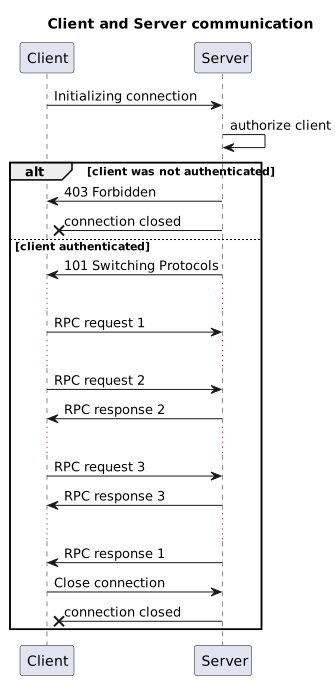
Use a dedicated handler subclass for each application. Registered routes are stored per handler class. Configure routes and signal handlers before accepting connections.
Function routes
An exposed function receives its connection as the first argument. RPC parameters are keyword arguments:
from wsrpc_aiohttp import WebSocketAsync


class Socket(WebSocketAsync):
    pass


async def subtract(socket: Socket, *, a: int, b: int) -> int:
    return a - b


Socket.add_route("subtract", subtract)
After connecting, a Python client can use either form:
result = await client.proxy.subtract(a=1, b=9)
result = await client.call("subtract", a=1, b=9)
For synchronous, blocking functions, use wsrpc_aiohttp.WebSocketThreaded as the handler base. It runs functions in the event loop’s thread pool. Use WebSocketAsync for coroutine handlers; WebSocketThreaded expects synchronous handlers and does not await a coroutine returned by one.
Stateful route classes
A route instance belongs to one connection and is created lazily when the client first accesses that route. Use __init__ for state that must exist before any method call. Route[Socket] preserves the concrete type of self.socket.
With wsrpc_aiohttp.Route, expose methods explicitly using @decorators.proxy:
from wsrpc_aiohttp import Route, WebSocketAsync, decorators


class Socket(WebSocketAsync):
    pass


class Storage(Route[Socket]):
    def __init__(self, socket: Socket) -> None:
        super().__init__(socket)
        self._values: dict[str, str] = {}

    @decorators.proxy
    def get(self, *, key: str, default: str | None = None) -> str | None:
        return self._values.get(key, default)

    @decorators.proxy
    def set(self, *, key: str, value: str) -> bool:
        self._values[key] = value
        return True


Socket.add_route("kv", Storage)
Python calls use the registered alias followed by the method name:
assert await client.proxy.kv.set(key="foo", value="bar")
assert await client.proxy.kv.get(key="foo") == "bar"
The JavaScript equivalent is:
await rpc.call("kv.set", {key: "foo", value: "bar"});
const value = await rpc.call("kv.get", {key: "foo"});
The following test continues the Storage definition above and checks that two connections have independent state:
import asyncio
from aiohttp import web
from aiohttp.test_utils import TestServer
from wsrpc_aiohttp import WSRPCClient


async def check_storage() -> None:
    app = web.Application()
    app.router.add_get("/ws/", Socket)
    async with TestServer(app) as server:
        endpoint = str(server.make_url("/ws/"))
        async with WSRPCClient(endpoint) as first:
            assert await first.proxy.kv.set(key="foo", value="bar")
            assert await first.proxy.kv.get(key="foo") == "bar"
            async with WSRPCClient(endpoint) as second:
                assert await second.proxy.kv.get(key="foo") is None


asyncio.run(check_storage())
Calling the bare alias, such as client.call("kv"), resolves a method named init. Expose init if you want that entry point. It is an explicit RPC call; it is not automatically run before another method. Override _onclose() for per-connection cleanup; it may be synchronous or asynchronous.
Other route policies are available:
Route class |
Exposed methods |
|---|---|
|
Methods marked with |
|
Public methods, except those marked with |
|
Methods beginning with |
Methods beginning with _ are not exposed by these policies. Use authorize() for connection-level authentication.
Server-to-client calls
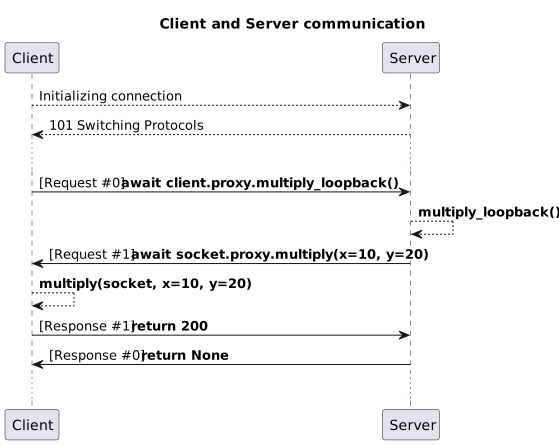
Register client methods before connecting. A server handler can call socket.proxy or socket.call() while processing a request. This complete example tests both directions:
import asyncio
from aiohttp import web
from aiohttp.test_utils import TestServer
from wsrpc_aiohttp import WebSocketAsync, WSRPCClient


async def main() -> None:
    class Socket(WebSocketAsync):
        pass

    async def multiply_loopback(socket: Socket) -> int:
        return await socket.proxy.multiply(x=10, y=20)

    def multiply(socket: WSRPCClient, *, x: int, y: int) -> int:
        return x * y

    Socket.add_route("multiply_loopback", multiply_loopback)
    app = web.Application()
    app.router.add_get("/ws/", Socket)
    async with TestServer(app) as server:
        client = WSRPCClient(str(server.make_url("/ws/")))
        client.add_route("multiply", multiply)
        async with client:
            assert await client.proxy.multiply_loopback() == 200


asyncio.run(main())
Errors and timeouts
Remote handler exceptions arrive as wsrpc_aiohttp.ClientException. Inspect its type and message attributes; the remote exception’s Python class is not recreated locally.
import asyncio
from wsrpc_aiohttp import ClientException

try:
    result = await client.call("slow_method", timeout=2)
except ClientException as error:
    print(error.type, error.message)
except asyncio.TimeoutError:
    print("The call did not finish within two seconds")
Set a client-wide default with WSRPCClient(url, timeout=...). A timeout stops waiting locally; it does not guarantee cancellation of the remote handler.
Authentication
Override authorize() on your handler. A false result rejects the WebSocket upgrade with HTTP 403. The following assumes your aiohttp middleware has already authenticated the request and set request["user"]:
from wsrpc_aiohttp import WebSocketAsync


class AuthenticatedSocket(WebSocketAsync):
    async def authorize(self) -> bool:
        return self.request.get("user") is not None
The handler can also inspect headers, cookies and application state through self.request.
JSON codecs and custom values
The default codec is standard-library json. Pass custom loads and dumps callbacks to the client constructor or Socket.configure(). A dumps callback must accept default=serializer and return text, because RPC uses text WebSocket frames.
import json
from wsrpc_aiohttp import WebSocketAsync


def dumps(value, *, default=None) -> str:
    return json.dumps(value, default=default, ensure_ascii=False)


class Socket(WebSocketAsync):
    pass


Socket.configure(loads=json.loads, dumps=dumps)
assert Socket.JSON_DUMPS({"message": "Привет"}) == '{"message": "Привет"}'
For custom Python values, register a conversion with wsrpc_aiohttp.serializer(). Return JSON-compatible data from the conversion. Bytes are encoded as base64 strings by the built-in serializer.
Resource ownership
Use async with WSRPCClient(...) or explicitly call connect() and close(). Closing a client also closes its HTTP session, including a session supplied with session=. Keep a supplied session dedicated to that client.