aiohttp browser demo
For the shared RPC walkthrough with framework tabs, see the quick start.
This example exposes a uuid4 method, serves the bundled JavaScript client, and provides both Python and browser clients.
Run the server
From the repository root, install the development environment and start the example:
uv sync --locked
uv run --locked python aiohttp/examples/main/server.py
The server listens on http://127.0.0.1:8000. Its static directory is resolved relative to the script, so the command works from the repository root.
import logging
import uuid
from pathlib import Path

from wsrpc_aiohttp import STATIC_DIR, WebSocketAsync

from aiohttp import web


class Socket(WebSocketAsync):
    pass


async def get_random_uuid(socket: Socket) -> str:
    return str(uuid.uuid4())


def create_app() -> web.Application:
    Socket.add_route("uuid4", get_random_uuid)
    app = web.Application()
    app.router.add_get("/ws/", Socket)
    app.router.add_static("/js/", STATIC_DIR)
    app.router.add_static("/", Path(__file__).parent)
    return app


if __name__ == "__main__":
    logging.basicConfig(level=logging.INFO)
    web.run_app(create_app(), host="127.0.0.1", port=8000)
Socket is a dedicated handler class. Registering its routes keeps them separate from applications using another handler class. Each exposed function receives the current connection as its first argument.
Call from Python
In another terminal:
uv run --locked python aiohttp/examples/main/client.py
import asyncio

from wsrpc_aiohttp import WSRPCClient


async def main(endpoint: str = "http://127.0.0.1:8000/ws/") -> None:
    async with WSRPCClient(endpoint) as client:
        print(await client.proxy.uuid4())


if __name__ == "__main__":
    asyncio.run(main())
The context manager connects the client on entry and closes the connection and its HTTP session on exit. Create clients inside an asynchronous function and start it with asyncio.run().
Call from a browser
Open http://127.0.0.1:8000/web-client.html and click Generate UUID.
<!doctype html>
<html lang="en">
<head>
  <meta charset="utf-8">
  <title>WSRPC quick start</title>
  <script src="/js/wsrpc.min.js"></script>
</head>
<body>
  <label>UUID <input id="result" readonly></label>
  <button id="generate" type="button">Generate UUID</button>
  <p id="error" role="alert"></p>
  <script>
    const url = new URL("/ws/", window.location.href);
    url.protocol = window.location.protocol === "https:" ? "wss:" : "ws:";
    const rpc = new WSRPC(url.toString());
    rpc.connect();

    document.getElementById("generate").addEventListener("click", async () => {
      document.getElementById("error").textContent = "";
      try {
        document.getElementById("result").value = await rpc.call("uuid4");
      } catch (error) {
        document.getElementById("error").textContent = error.message || String(error);
      }
    });
  </script>
</body>
</html>
The page constructs a WebSocket URL from its own origin, selecting ws:// for HTTP and wss:// for HTTPS. The script is served at /js/wsrpc.min.js from the installed Python package.
Test a complete round trip
For tests or scripts that need a temporary server, aiohttp.test_utils.TestServer selects an available local port. This example is executed by markdown-pytest:
import asyncio
from aiohttp import web
from aiohttp.test_utils import TestServer
from wsrpc_aiohttp import WebSocketAsync, WSRPCClient


async def main() -> None:
    class Socket(WebSocketAsync):
        pass

    async def multiply(socket: Socket, *, x: int, y: int) -> int:
        return x * y

    Socket.add_route("multiply", multiply)
    app = web.Application()
    app.router.add_get("/ws/", Socket)
    async with TestServer(app) as server:
        async with WSRPCClient(str(server.make_url("/ws/"))) as client:
            assert await client.proxy.multiply(x=6, y=7) == 42


asyncio.run(main())
Message flow
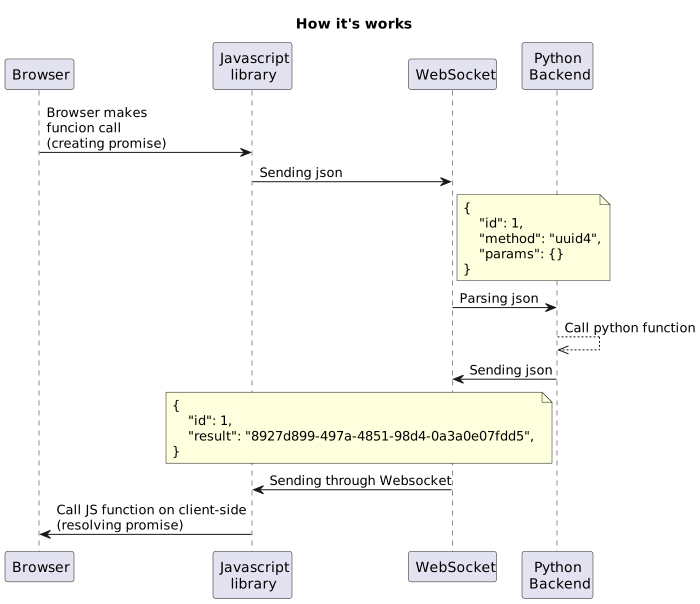
Either side can initiate a call while earlier calls are still running. Responses carry the request identifier, so they can arrive in a different order from the requests.